

How to Make a Voronoi Diagram in AutoCAD (3 Ways)
How to Make a Voronoi Diagram in AutoCAD (3 Ways)
AUTOCAD GUIDE
How to make a Voronoi pattern in AutoCAD
Facade panels, privacy screens, laser-cut art, organic paving — the Voronoi pattern is everywhere in current design. And AutoCAD has no command for it: type VORONOI into a stock AutoCAD and nothing happens. Here are the three real ways to get one into your drawing.
Method 1 — construct it by hand
A Voronoi diagram is a geometric construction: scatter points, connect each point to its neighbours, draw the perpendicular bisector of each connection, and trim the bisectors against each other. Each point ends up enclosed by its nearest-territory cell. It genuinely works — and for anything past half a dozen points it is an afternoon of TRIM. There is also no way to keep an even spacing between cells or follow a curved boundary.
Method 2 — free point-based LISP routines
The CAD portals share free AutoLISP routines that automate that construction: load with APPLOAD, scatter seed points, run the command, get a meshed diagram. For a quick illustration they do the job. Their limits show when you want to build the result: the cells share edges (no gap for the remaining material), the diagram is not clipped to your shape, and spacing, edge distance and corner rounding are not concepts they have. If you enjoy free LISP, our free AutoCAD LISP collection has 30+ tested routines for everyday drafting.
Method 3 — one dialog with Voronoi Generator
Voronoi Generator is our add-in built for the fabrication case. Select any closed polyline — arcs welcome — set spacing, edge distance, cell size and rounding, preview live, and generate. Every cell is a clean closed polyline with an exact gap to its neighbours, clipped to a true inward offset of your boundary — ready for HATCH, EXTRUDE or the cutting table.
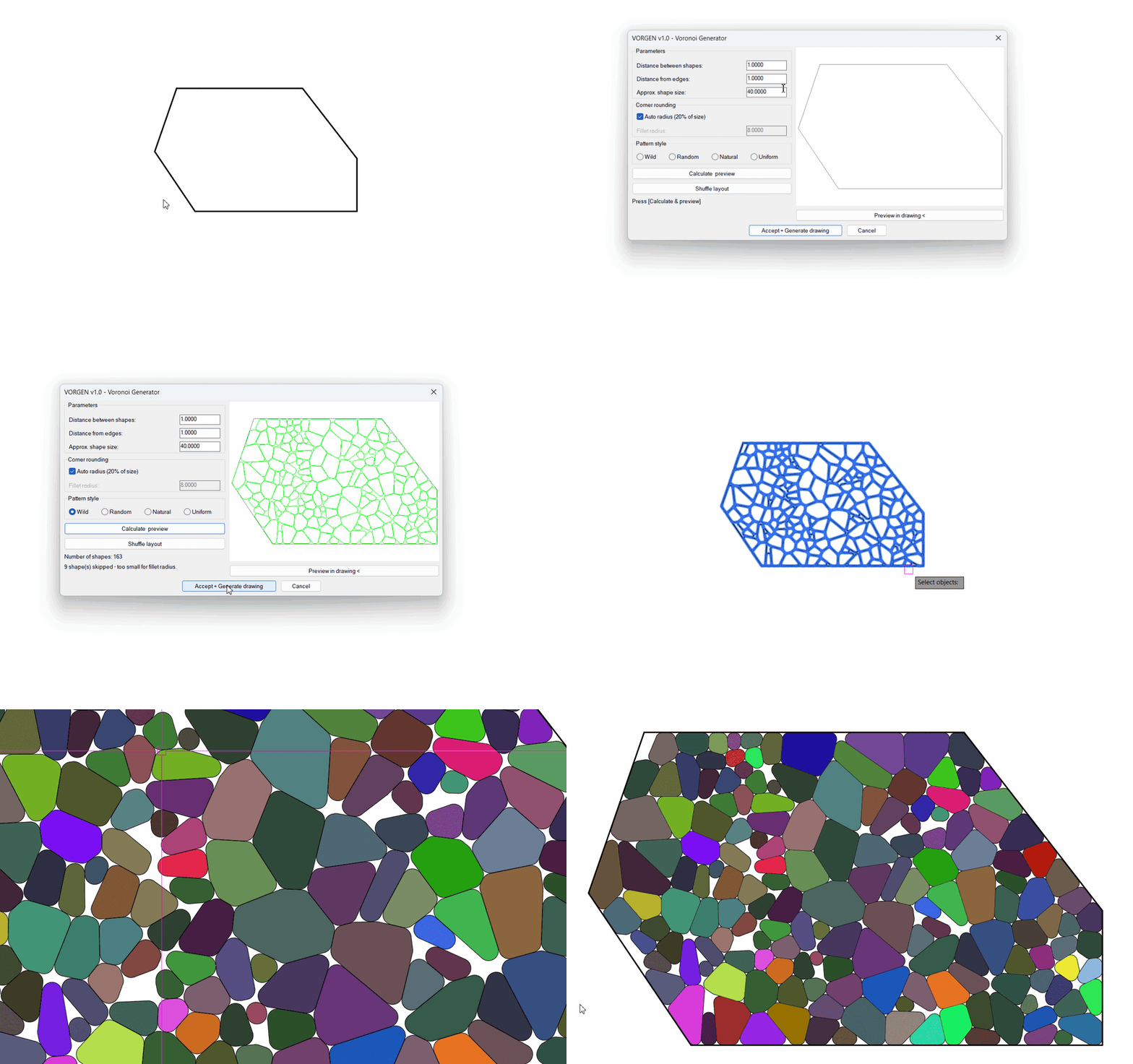
And because each cell is a separate closed polyline, hatching them in different colours turns the pattern into a mosaic — here in a real landscape plan, 266 cells on the pond generated in one pass:

Frequently asked questions
Does AutoCAD have a Voronoi command?
No. There is no native Voronoi tool in any AutoCAD release. Every native route is a construction: scatter points, draw perpendicular bisectors between neighbours, and trim – workable as an exercise, unusable for a real panel.
Can I use the free Voronoi LISP routines?
Yes, and for a raw diagram they are fine: they mesh a set of points into cells. But the cells share edges (no gap between them), the diagram is not clipped to your shape, and there is no control of spacing, edge distance or rounding – so the result usually is not something you can fabricate.
What do I need for laser cutting or CNC?
Closed polylines with a real gap between cells – the gap becomes the remaining material, so it must be exact, not approximate. That is precisely what a purpose-built generator gives you and point-based diagrams do not.
Can the cells be hatched in different colours – like a mosaic?
Yes – every generated cell is its own closed polyline, so HATCH treats each one as a separate boundary. Colouring them cell by cell turns a walkway or a pond plan into a Gaudí-style mosaic.
From the same workshop




Prefer free tools? Browse our free AutoCAD LISP collection — 30+ routines, all free, all tested on real projects.

How to Get Contours from Google Earth into AutoCAD (Free Way and 1-Minute Way)
