
Blog

Google Earth’ten AutoCAD’e Eş Yükselti Eğrileri Nasıl Alınır (Ücretsiz veya 1 Dakikada)
KISA CEVAP Google Earth eş yükselti eğrilerini dışa aktaramaz, düz AutoCAD de onları üretemez. Arada yükseklik verisini alıp çizgileri çizen bir adım gerekir. Bu adımı atmanın üç yolu var: yaklaşık ...
21st October 2026

Google Earth 3D Araziyi Bir Dakikadan Kısa Sürede STL veya STEP’e Aktarın
3D ARAZİ REHBERİ Google Earth 3D araziden gerçek bir 3D modele, bir dakikadan kısa sürede Google Earth her tepeyi ve her vadiyi 3D gösterir, ama o araziyi dışa aktarmanın bir ...
21st October 2026
Come portare le curve di livello da Google Earth in AutoCAD (gratis o in 1 minuto)
RISPOSTA DIRETTA Google Earth non esporta le curve di livello, e AutoCAD base non le genera. Serve un passaggio intermedio che scarichi le quote e disegni le linee. Ci sono ...
21st October 2026
Terreno 3D da Google Earth a STL o STEP in meno di un minuto
GUIDA AL TERRENO 3D Dal terreno 3D di Google Earth a un vero modello 3D, in meno di un minuto Google Earth mostra ogni collina e ogni valle in 3D, ...
21st October 2026
Courbes de niveau de Google Earth dans AutoCAD (gratuit ou en 1 minute)
LA RÉPONSE COURTE Google Earth n’exporte pas de courbes de niveau, et AutoCAD seul ne sait pas les générer. Il faut une étape intermédiaire qui récupère l’altitude et trace les ...
21st October 2026
Terrain 3D de Google Earth en STL ou STEP en moins d’une minute
GUIDE TERRAIN 3D Du terrain 3D de Google Earth à un vrai modèle 3D, en moins d’une minute Google Earth montre chaque colline et chaque vallée en 3D, mais il ...
21st October 2026

Como calcular e rotular áreas no AutoCAD (também no AutoCAD LT)
RESPOSTA DIRETA O AutoCAD sabe a área de cada ambiente fechado, mas só mostra, um objeto por vez, e não escreve nada no desenho. Rotular é sempre um passo a ...
26th September 2026
Cómo calcular y rotular áreas en AutoCAD (también en AutoCAD LT)
RESPUESTA DIRECTA AutoCAD conoce el área de cada recinto cerrado, pero solo la muestra, un objeto a la vez, y no escribe nada en el dibujo. Rotular es siempre un ...
26th September 2026
Como levar curvas de nível do Google Earth para o AutoCAD (grátis ou em 1 minuto)
RESPOSTA DIRETA O Google Earth não exporta curvas de nível, e o AutoCAD puro não as gera. É preciso um passo no meio que busque a elevação e desenhe as ...
26th September 2026
Terreno 3D do Google Earth para STL ou STEP em menos de um minuto
GUIA DE TERRENO 3D Do terreno 3D do Google Earth a um modelo 3D de verdade, em menos de um minuto O Google Earth mostra cada morro e cada vale ...
26th September 2026
Cómo pasar curvas de nivel de Google Earth a AutoCAD (gratis o en 1 minuto)
RESPUESTA DIRECTA Google Earth no exporta curvas de nivel, y AutoCAD a secas no las genera. Hace falta un paso intermedio que descargue la elevación y dibuje las líneas. Hay ...
26th September 2026
Terreno 3D de Google Earth a STL o STEP en menos de un minuto
GUÍA DE TERRENO 3D Del terreno 3D de Google Earth a un modelo 3D real, en menos de un minuto Google Earth muestra cada colina y cada valle en 3D, ...
26th September 2026
Raumflächen in AutoCAD berechnen und beschriften (auch AutoCAD LT)
KURZE ANTWORT AutoCAD kennt die Fläche jedes geschlossenen Raums – zeigt sie aber nur an, ein Objekt auf einmal, und schreibt nichts in die Zeichnung. Beschriften heißt also immer: ein ...
26th September 2026
Höhenlinien aus Google Earth in AutoCAD (kostenlos oder in einer Minute)
KURZE ANTWORT Google Earth kann keine Höhenlinien exportieren, und AutoCAD allein kann keine erzeugen. Es braucht einen Schritt dazwischen, der die Höhendaten holt und die Linien zeichnet. Dafür gibt es ...
26th September 2026
How to Get Contours from Google Earth into AutoCAD (Free Way and 1-Minute Way)
STRAIGHT ANSWER Google Earth cannot export contours, and plain AutoCAD cannot make them. You need a step in between that fetches the elevation and draws the lines. There are three ...
26th September 2026
Google Earth 3D-Gelände als STL oder STEP in unter einer Minute
3D-GELÄNDE ANLEITUNG Google Earth 3D-Gelände als echtes 3D-Modell, in unter einer Minute Google Earth zeigt jeden Hügel und jedes Tal in 3D, aber es gibt keinen Weg, dieses Gelände zu ...
26th September 2026
Google Earth 3D Terrain to STL or STEP in Under a Minute
3D TERRAIN GUIDE Google Earth 3D terrain into a real 3D model, in under a minute Google Earth shows every hill and valley in 3D, but there is no way ...
26th September 2026

DEM, DSM, DTM: What the Letters Mean, and the 97-Foot Mistake They Cause
Two free elevation models of the same Oregon forest differ by 97 feet. Neither is broken - they measure different things. What DEM, DSM and DTM actually mean, how to tell which you have in thirty seconds, and what it costs on a grading plan.
15th September 2026

RINGCLEAR – Erase Everything Between Two Boundaries (Free AutoCAD LISP)
FREE AUTOCAD LISP RINGCLEAR — empty the ring between two closed shapes, cut at the edge Pick an outer closed shape, pick an inner one, and everything trapped between the ...
15th September 2026

RANDHATCH – Fill Closed Shapes with Random Colors (Free AutoCAD LISP)
FREE AUTOCAD LISP RANDHATCH — every shape a different color, in one selection Select your closed shapes, and each one gets a solid hatch in its own random color. Plots, ...
14th September 2026

How to Make a Coordinate Table in AutoCAD (3 Ways)
AUTOCAD GUIDE How to make a coordinate table in AutoCAD A parcel plan is not finished until the corners are numbered, the side lengths are on the sides, and a ...
3rd September 2026

How to Make a Voronoi Diagram in AutoCAD (3 Ways)
AUTOCAD GUIDE How to make a Voronoi pattern in AutoCAD Facade panels, privacy screens, laser-cut art, organic paving — the Voronoi pattern is everywhere in current design. And AutoCAD has ...
21st August 2026

How to Label Areas and Make an Area Table in AutoCAD (3 Ways)
AUTOCAD GUIDE How to label areas and make an area table in AutoCAD Rooms on a floor plan, plots on a survey, zones on an irrigation layout — sooner or ...
21st August 2026
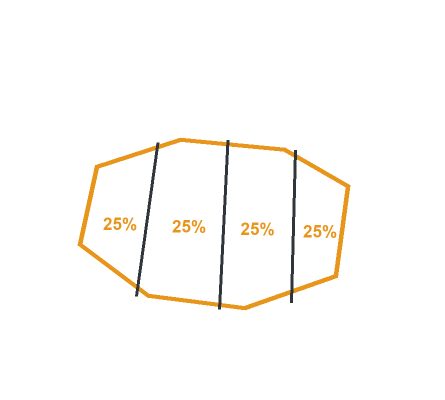
How to Divide a Polygon into Equal Parts in AutoCAD (3 Ways)
AUTOCAD GUIDE How to divide a polygon into equal parts in AutoCAD You have a closed shape — a plot, a parcel, a zone, a field — and you need ...
20th August 2026

IRRLINE – Irrigation Line Parallel to a Plot Border (Free AutoCAD LISP)
FREE AUTOCAD LISP IRRLINE — the irrigation line that follows your plot border, curves included Select the plot, pick where the line starts and ends, type the offset — and ...
11th August 2026

SPEED – Dirt Jump Trajectory Calculator (Free AutoCAD LISP)
FREE AUTOCAD LISP SPEED — draw the jump before you build it The odd one out, and proudly so: give SPEED an initial velocity (km/h), a take-off angle and a ...
11th August 2026

CX – Crop an Xref with a Comic-Style Callout (Free AutoCAD LISP)
FREE AUTOCAD LISP CX — crop any xref and frame it like a comic callout CX clips an image, PDF or DWG xref and frames the chosen area as a ...
11th August 2026

NL – New Layer, Fast (Free AutoCAD LISP)
FREE AUTOCAD LISP NL — name it, colour it, you’re drawing on it Type NL, enter the layer name in the small dialog, pick a colour — and the layer ...
11th August 2026

BOXCOUNT – Total Length of 3D Solid Boxes (Free AutoCAD LISP)
FREE AUTOCAD LISP BOXCOUNT — total length of your 3D box profiles, by size The rectangular cousin of PIPES: select your 3D solids and BOXCOUNT totals the length of every ...
11th August 2026

SRE – Sweep a Rectangular Profile / RHS in 3D (Free AutoCAD LISP)
FREE AUTOCAD LISP SRE — RHS profiles in 3D, faster than SWEEP will ever be SRE sweeps a rectangular hollow section along your path from a simple dialog — width, ...
11th August 2026

AD – Automatic Dimensions for Polylines (Free AutoCAD LISP)
FREE AUTOCAD LISP AD — pick a polyline, get a dimension on every segment Pick one polyline and AD dimensions every segment of it, end to end. You do not ...
11th August 2026

LL – Label Lines with Their Layer Name (Free AutoCAD LISP)
FREE AUTOCAD LISP LL — every line labelled with its own layer name, aligned Select lines, polylines, arcs, circles or ellipses and LL writes each one’s layer name on the ...
11th August 2026

JB – Just Break at a Point (Free AutoCAD LISP)
FREE AUTOCAD LISP JB — break at a single point, one command, no ritual AutoCAD’s BREAK wants two points and a lecture. JB is the shortcut everyone actually wants: select ...
11th August 2026

BAD – Break a Curve at a Typed Distance (Free AutoCAD LISP)
FREE AUTOCAD LISP BAD — break exactly at the distance you type Pick a line, polyline, spline or arc and BAD shows you its total length, then breaks it at ...
11th August 2026

LEGEND – Automatic Legend from Your Layers (Free AutoCAD LISP)
FREE AUTOCAD LISP LEGEND — the drawing’s legend, built from what you select Select the objects that should be explained and LEGEND builds the legend for you — one row ...
11th August 2026

PUT – Insert a Block at a Set Distance Along a Curve (Free AutoCAD LISP)
FREE AUTOCAD LISP PUT — drop a named block at an exact distance along any curve PUT places a block you name at a specified distance measured along a polyline, ...
11th August 2026

S2 – Sum Numbers from Text Entities (Free AutoCAD LISP)
FREE AUTOCAD LISP S2 — add up the numbers in your drawing’s text Select text entities that hold numbers and S2 adds them up — then either replaces an existing ...
11th August 2026
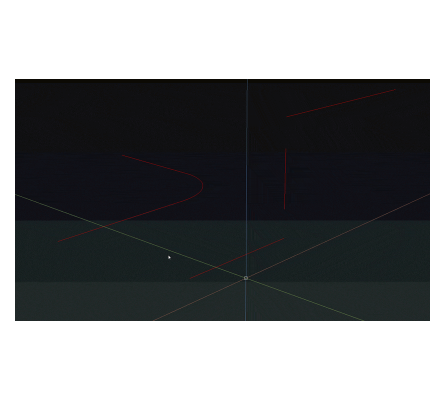
XPIPE – 3D Pipes from a Diameter (Free AutoCAD LISP)
FREE AUTOCAD LISP XPIPE — 3D solid pipes from a diameter, no SWEEP gymnastics Type a diameter and XPIPE builds the pipe as a 3D solid along your path — ...
11th August 2026

SS – A Better Select Similar (Free AutoCAD LISP)
FREE AUTOCAD LISP SS — Select Similar, the way it should have worked Like AutoCAD’s SELECTSIMILAR, but sharper: SS filters by object type, layer, colour and linetype together, works only ...
11th August 2026
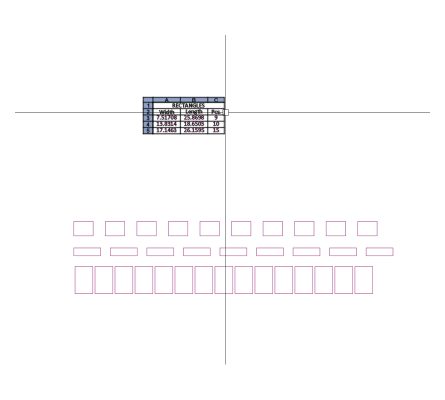
RECDIMS – Count Rectangles by Size into a Table (Free AutoCAD LISP)
FREE AUTOCAD LISP RECDIMS — count your rectangles by size, straight into a table Select your rectangles and RECDIMS counts them by dimension — and by colour — then inserts ...
11th August 2026
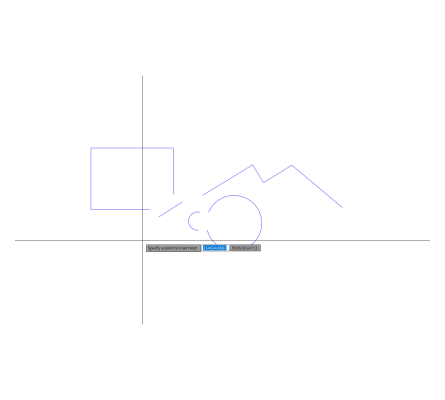
LPL – Sum Lengths and Label the Total (Free AutoCAD LISP)
FREE AUTOCAD LISP LPL — total length of your selection, placed as a label Select any mix of lines, polylines, splines, arcs, circles and ellipses, and LPL adds up their ...
11th August 2026

CBRK & CBRKA – Break a Circle or Arc into Equal Parts (Free AutoCAD LISP)
FREE AUTOCAD LISP CBRK & CBRKA — slice circles and arcs into equal segments CBRK asks one question — how many sections? — and slices every selected circle into that ...
11th August 2026
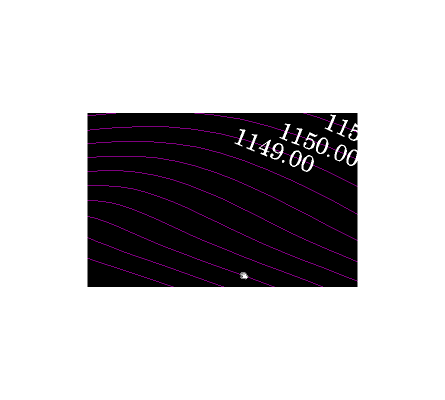
ZLABEL – Label Z Values on Contour Lines (Free AutoCAD LISP)
FREE AUTOCAD LISP ZLABEL — label the Z value of every contour line, automatically Topography drawings live and die by their elevation labels. ZLABEL reads the Z value of the ...
11th August 2026

RPS – Layout Paper Size from a Rectangle (Free AutoCAD LISP)
FREE AUTOCAD LISP RPS — make the layout’s paper size match your rectangle Draw the rectangle that represents your sheet, run RPS, and the current layout’s paper size becomes exactly ...
11th August 2026

PJ – Convert Lines to Polylines (Free AutoCAD LISP)
FREE AUTOCAD LISP PJ — lines in, joined polylines out Select any number of LINE entities and PJ converts them to polylines and joins everything that touches — one command ...
11th August 2026

43 – Offset One Polyline Segment (Free AutoCAD LISP)
FREE AUTOCAD LISP 43 — offset a single segment of a polyline, nothing exploded OFFSET copies the whole polyline; exploding it wrecks the drawing. Command 43 offsets just the segment ...
11th August 2026

QB – Quick Block from Selection (Free AutoCAD LISP)
FREE AUTOCAD LISP QB — a block out of your selection, instantly QB turns whatever you select into a block in one step — the name is generated automatically and ...
11th August 2026

UNIP – Union Polylines into One Outer Boundary (Free AutoCAD LISP)
FREE AUTOCAD LISP UNIP — merge overlapping shapes into a single outer polyline Select overlapping closed polylines and UNIP replaces the tangle with one polyline tracing the outer perimeter — ...
11th August 2026
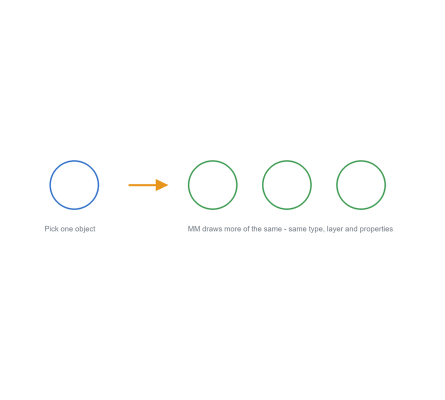
MM – Make More of the Same Object (Free AutoCAD LISP)
FREE AUTOCAD LISP MM — pick any object, draw more exactly like it Pick one object and MM starts the right drawing command for more of the same — on ...
11th August 2026
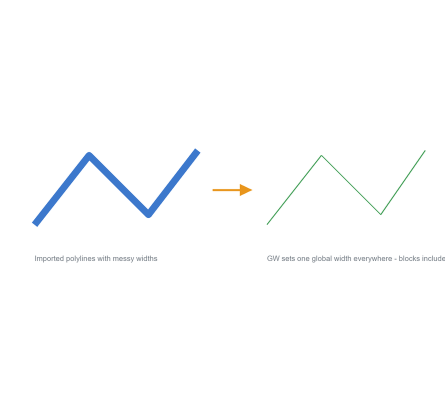
GW – Set Global Width of All Polylines (Free AutoCAD LISP)
FREE AUTOCAD LISP GW — one global width for every polyline in the drawing, blocks included Drawings imported from GIS and other software often arrive with fat, uneven polyline widths ...
11th August 2026